
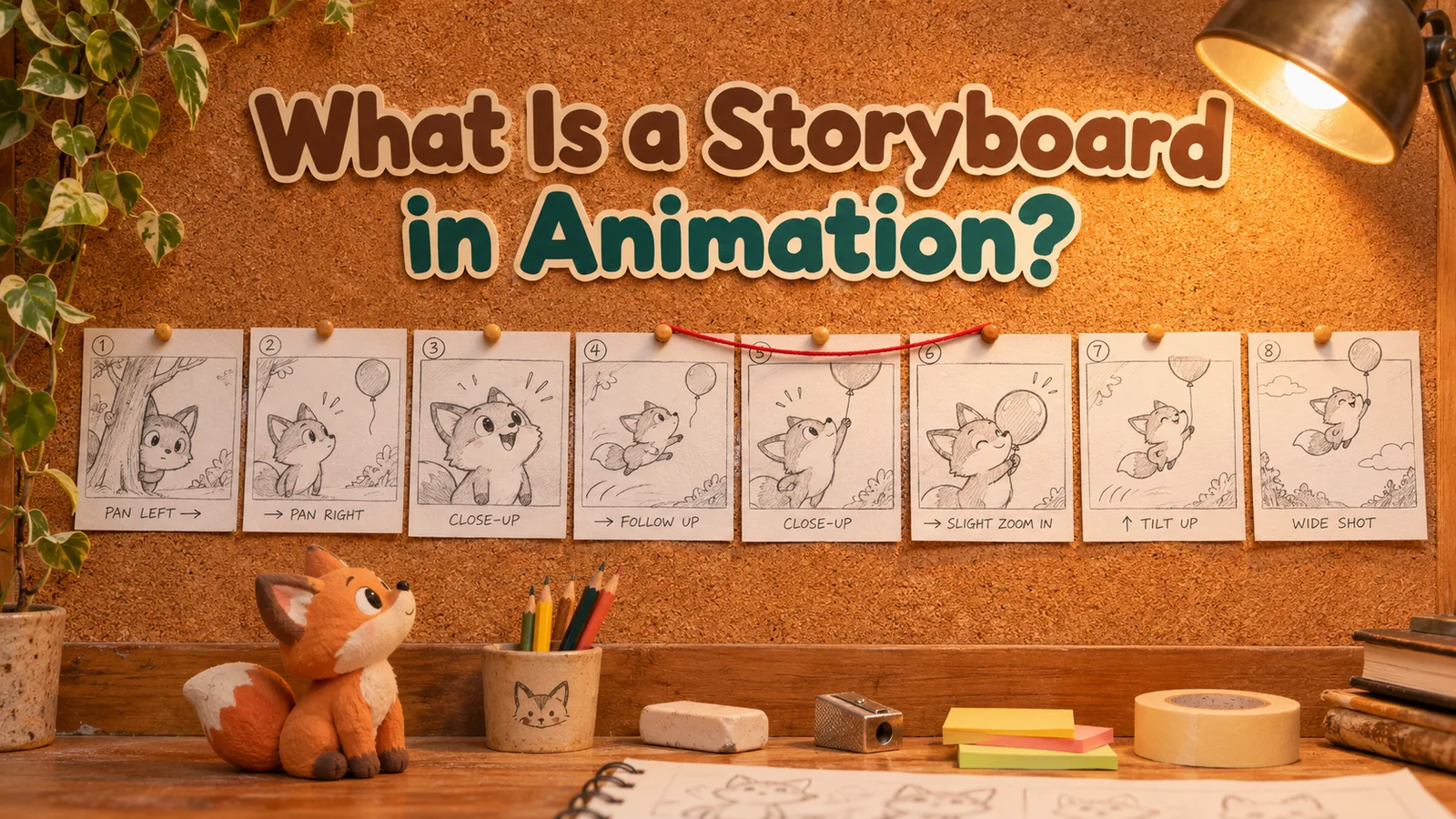
A storyboard in animation is a sequence of drawings, shot by shot, that shows how a script will play out on screen before a single frame is animated. It is the blueprint for the whole production. It fixes what the audience sees, from which angle and in what order, while a change still costs a pencil line instead of a re-render.
If you are commissioning a series, an ad or an explainer, the board is the first time your project becomes something you can actually see. This guide covers what an animation storyboard includes, the main types of storyboards, how to make a storyboard the way studios do, real storyboard examples, and how to review one before you sign off.
What is a storyboard? The meaning in plain words#
The simplest storyboard meaning is "a story told in panels". Each panel is one shot, or one key moment inside a shot, drawn quickly and laid out in order like a comic strip. Under each panel sit notes on dialogue, action, camera movement and sound.
So what is storyboarding? It is the process of turning a written script into those panels. Storyboarding as a studio practice took shape at Disney in the early 1930s, when story artists began pinning sketches to boards on the wall so the team could read a whole film at a glance and rearrange it. Today most boards are drawn digitally in tools such as Toon Boom Storyboard Pro or Photoshop, but the idea has not changed.
Why a storyboard in animation matters#
Animation is expensive to change once it is built. Every shot passes through layout, animation, lighting or colour, and compositing. A storyboard in animation catches problems before any of that work begins.
It does three jobs at once:
It tests the story. Weak jokes, confusing reveals and slow scenes show up on the board, not in the final cut.
It plans the production. Shot counts, camera moves and character poses tell the studio how much work each scene needs.
It aligns everyone. Directors, animators and clients look at the same panels and agree on the same film.
Live-action crews can reshoot. Animation teams cannot, at least not cheaply. That is why animation storyboarding is more detailed than most live-action boards.
What does a storyboard in animation include?#
A production-ready animation storyboard is more than a set of nice drawings. Every panel answers a practical question for the people who will build the shot.
The frame. Panels are drawn in the final aspect ratio, 16:9 for YouTube and TV, 9:16 for Shorts and Reels, so composition is decided early.
Staging. Where each character stands, what they are doing and where the eye should go.
Camera. Arrows and notes for pans, zooms, truck-ins and cuts. In 3D, this tells the layout team where to place the virtual camera.
Acting beats. Key poses and expressions, especially on reaction shots, where the emotion lives.
Dialogue and sound. The line being spoken, music cues and important sound effects.
Shot and scene numbers. These become the labels every department uses for the rest of the project.
A simple test: hand the board to an animator who has never read the script. If they can tell you what happens, the board is doing its job.
Types of storyboards#
Studios use several types of storyboards, each at a different moment in pre-production.
Thumbnail storyboards. Tiny, fast sketches, sometimes just stick figures, used to test the order of shots and the flow of a scene. Rarely shown outside the story team.
Rough (story) storyboards. The working version. Clear enough to read, loose enough to change. Most creative decisions and most client feedback happen here.
Clean-up storyboards. Tidied, on-model drawings with consistent characters and clear camera notes. These go to production and guide layout and animation.
Presentation storyboards. Polished, often coloured panels used to pitch a series, an ad or a campaign. They sell the idea rather than guide the build.
Animatics. When the panels are timed to dialogue, music and sound and played as a video, the board becomes an animatic. Our guide to what an animatic is explains the storyboard vs animatic difference in detail.
2D and 3D projects use the same types of storyboards. In 3D, the clean-up board often carries extra camera information, because the layout artist rebuilds each shot inside the software.
How to make a storyboard: the studio process#
Every studio has its own habits, but the steps of storyboarding look much the same everywhere. Here is how to make a storyboard for animation, from script to locked boards.
1. Break down the script. The storyboard artist reads the script, or a short treatment for ads, and marks every scene, location and story beat.
2. Thumbnail the sequence. Quick sketches test how many shots a scene needs and in what order. This is the cheapest moment to change the structure of an episode.
3. Draw the rough storyboard. Each shot gets a readable panel with staging, camera and acting notes. Character model sheets and location designs keep the drawings consistent.
4. Add dialogue, sound and timing notes. Lines and sound effects go under each panel, and rough timing is noted so the edit can be planned.
5. Review with the director and the client. Story problems come to light here: a joke that lands too early, a reveal the audience sees coming, a shot that does not read. Fixes happen on paper.
6. Clean up and lock. Approved panels are cleaned up, numbered and handed on to the animatic, then layout and animation.
Storyboarding sits at the centre of a studio's pre-production services, alongside script, character design and the animatic. When it is skipped or rushed, the problems do not disappear. They turn up in production, where every change costs far more.
What does a storyboard artist actually do?#
A storyboard artist is part director, part cinematographer and part actor. They decide where the camera sits, how each character moves through the frame and which moment of an action is strongest to draw. Good storyboard artists draw fast and loose, and they think in edits as much as in images.
Storyboard examples: what good boards look like#
Good storyboard examples share a few habits, whatever the style or budget.
Clarity over polish. A rough sketch with a clear silhouette beats a beautiful drawing nobody can read at a glance.
Variety in shot size. Wide shots set the scene, mid shots carry action, close-ups carry emotion. A board full of identical mid shots usually means a flat episode.
Consistent screen direction. If a character runs left to right, they keep running left to right unless the board deliberately turns them.
Strong key poses. Panels capture the most expressive moment of an action, not the dull middle of it.
Notes that answer questions. "Camera slowly pushes in as she realises" tells a 3D layout artist exactly what to build.
To see a storyboard in animation next to the finished scene, look for the story reels Pixar and Disney often include as extras on their films. Watching the two side by side shows how much of the final film is already decided on the board.
How to review a storyboard as a client#
Most clients are asked to approve boards without being told what to look for. Use this checklist.
Read it like a comic, without the script. Does the story still make sense? If not, the audience may be lost too.
Check the brand and the characters. Are logos, products, colours and character features shown the way your guidelines require?
Look hard at the first and last shots. On YouTube and in ads, the opening seconds decide whether people keep watching, and the ending decides what they do next.
Ask about anything you cannot picture. A good studio will happily explain a camera move or a transition.
Send all your notes in one round. Spread-out feedback slows the schedule more than any single change.