
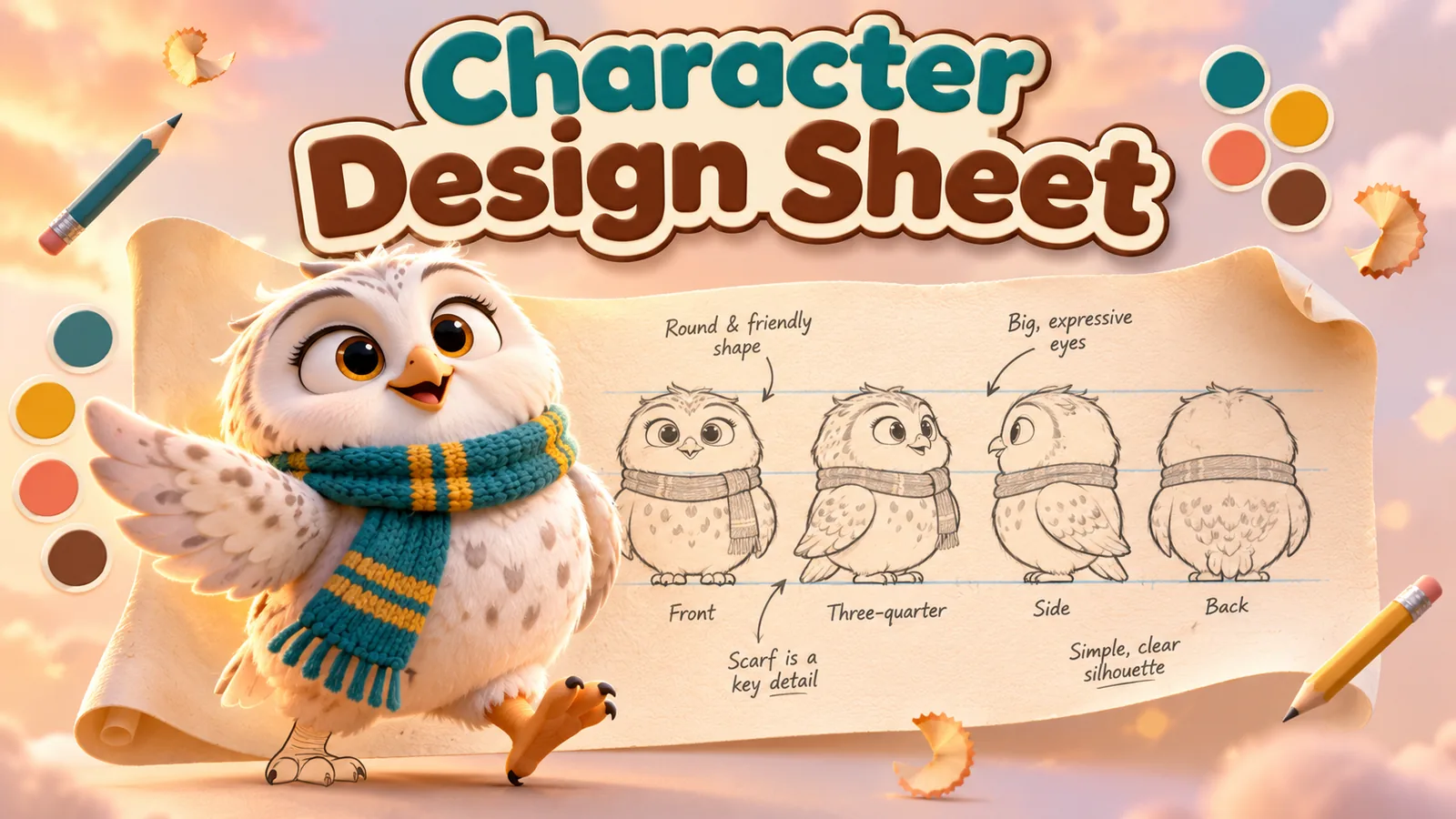
A character design sheet is the one document every artist on a production opens before they draw, model or animate a character. If you're commissioning an animated series, a YouTube show or a brand mascot, it's also the first thing you should ask your studio for. This guide explains what a character design sheet is, the seven parts a production-ready sheet includes, and how 2D and 3D teams use it differently.
What Is a Character Design Sheet?#
A character design sheet is a set of reference drawings that fixes how a character looks from every angle, in every mood and in every colour, so that anyone who draws or builds that character gets it the same way. You'll also hear it called a model sheet, a character model sheet or a character reference sheet. In a studio, all four names point to the same thing: the rulebook for one character.
The test of a good sheet is simple. Hand it to an animator who has never seen the character, and they should be able to draw it "on model" without asking a single question.
Why the Sheet Matters in Production#
A character is drawn thousands of times across a series, by many different hands. Without a shared reference, small differences creep in: the eyes sit a little higher in one episode, the scarf changes colour in another, the ears grow between seasons. Viewers notice, and kids notice fastest.
A good sheet stops that drift before it starts. It also saves money and rework later, because fixing an off-model character in final animation means redrawing or re-rendering finished shots. Catching the problem on paper costs almost nothing.
At Monal Digital, the sheet does one more job for the client: it's the moment you approve the character. Once it's signed off, everyone downstream, from storyboard artists to riggers, works from the same approved look.
The 7 Parts of a Production-Ready Character Design Sheet#
Not every sheet needs every part, but a series character usually does. Here's what Monal Digital includes and why.
1. The Turnaround#
The character turnaround shows the full body from the front, three-quarter front, side, three-quarter back and back, all lined up on the same horizontal guidelines. Those lines lock the height of the head, shoulders, waist and knees across every view. For 3D, the front and side views double as the orthographic references a modeller builds from.
2. Construction and Proportions#
This part breaks the character into basic shapes: circles, ovals and simple forms that show how the head, body and limbs are built. It usually states the height in "heads" (how many head-lengths tall the character is) so proportions stay fixed even when an artist draws freehand.
3. The Expression Sheet#
The expression sheet shows the character's face across its key emotions: happy, sad, angry, surprised, scared, thinking. A good one goes further and captures the character's own version of each emotion. A shy character's happy face should look different from a loud one's.
4. Pose and Action Sheet#
Here the character moves: running, sitting, jumping, waving, holding props. Poses show body language and the limits of the design, like how far the arms can stretch or how the costume behaves in motion. This is where personality becomes visible in the whole body, not just the face.
5. Mouth Chart for Lip Sync#
For any character who speaks, a mouth chart shows the shapes for the main sounds of speech. Animators match these shapes to the dialogue track, so the same "oo" or "ee" looks the same in every scene.
6. Colour Model#
The colour model fixes the exact colours of skin, hair, eyes, clothing and accessories, usually with colour codes. It often includes variations for night scenes or special lighting. Without it, colours shift slightly from one artist's screen to another's.
7. Details, Props and Size Line-Up#
Close-ups cover the parts that are easy to get wrong: hands, shoes, hairstyles, logos on clothing, a signature prop. A line-up places the character beside the rest of the cast, so everyone knows how tall they are next to each other.
How 2D and 3D Teams Use the Sheet#
The same sheet serves both pipelines, but each team reads it differently.
In 2D animation, the sheet is consulted on every shot. Animators and cleanup artists keep it open beside them, checking proportions, line weight and expressions as they draw frame after frame.
In 3D animation, the sheet comes first and then becomes the model itself. Modellers build the character in software like Blender or Maya from the turnaround and orthographic views. Riggers then use the pose and expression pages to decide how the face and body need to move. Once the 3D model is approved, it becomes the source of truth, but the sheet is still the reference everyone goes back to when a question comes up.
Either way, the sheet belongs to pre-production. It sits alongside the script, the storyboard and the animatic as the plan the rest of the production follows.
Model Sheet, Reference Sheet, Turnaround: What's the Difference?#
These terms get mixed up, so here's how they're usually used in a studio:
| Term | What it usually means |
|---|---|
| Character design sheet | The full reference package for one character |
| Model sheet / character model sheet | Same as above; the older, traditional animation term |
| Character reference sheet | Same idea; the term often used by illustrators and comic artists |
| Character turnaround | One part of the sheet: the rotating full-body views |
| Expression sheet | One part of the sheet: the face across emotions |
If a studio or freelancer says they'll deliver a "turnaround" only, ask whether expressions, poses and the colour model are included. A turnaround on its own isn't a full character design sheet.
How to Review a Character Design Sheet as a Client#
You don't need to draw to review a sheet well. Ask these questions:
- Is it recognisable in silhouette? Fill the character in black. If you can still tell who it is, the design is strong.
- Does it match the brief? Age, personality and audience should all read at a glance.
- Are the views consistent? The head, eyes and shoulders should line up across every turnaround view.
- Can it be animated? Very fine detail, like busy patterns, thin lines or lots of loose accessories, looks lovely in a still drawing but is hard to keep stable across a long series.
- Is everything you need included? Check for expressions, mouth shapes, colours and props before you sign off.
Approving changes at this stage is quick. Approving them after animation has started is not.
How Monal Digital Builds a Character Design Sheet#
At Monal Digital, character design is part of our pre-production services. Every sheet we deliver is drawn by our in-house artists. We don't use AI in pre-production or production. The sheet goes through rounds of feedback with the client until the character is approved, and only then does it move into storyboard, modelling and rigging.
Because we're a full-service 2D and 3D studio, the same team that designs the character also takes it into 2D and 3D animation services. Nothing gets lost in a handover between companies. Monal Digital LLP was incorporated in 2020, and our team brings 10+ years of experience in children's content from before that. We work with studios, brands and channel owners worldwide from Haldwani, in the Himalayan foothills.